How do you choose referral software? Start with your customers. Picture a new customer joining your program, sharing and seeing their friend rewarded. Then pick the tool that fits that experience and the systems you use. The feature list comes second.
We make referral software, so I'm on the other side of this decision every week. We went back through 91 of our sales calls from the last few months to see what buyers ask. Most want the price and whether it syncs with their CRM, where they keep customers and deals. Both matter, and both are covered here.
This guide shows how to choose referral software, starting with whether you're ready and what you sell. Then it walks through 7 steps a new customer goes through in your program, with the questions to ask on a demo at each one. Next comes a requirements checklist to use as a scorecard, then the help, the costs and the red flags. It names no tools and ranks no one.
The call quotes in this article come from our 2026 sales and customer calls, shared without names.
What is referral software (and what isn't it)?
Referral software runs a customer referral program for you, and it does three jobs. It makes the ask, tracks each referral back to the sharer (the customer who passed it on), and delivers the reward. Everything else is detail around those three jobs.
Done by hand, those jobs make a long list. Someone reads every referral, checks it's real, notes when it came in, follows up with the friend and makes sure each referrer gets paid.
Four kinds of tools get mixed up with it, but each does a different job. Affiliate software pays outside promoters who sign themselves up. Loyalty software rewards customers for buying again. Contest and waitlist tools run a launch for a few weeks, and hiring tools handle employee referrals for open jobs.
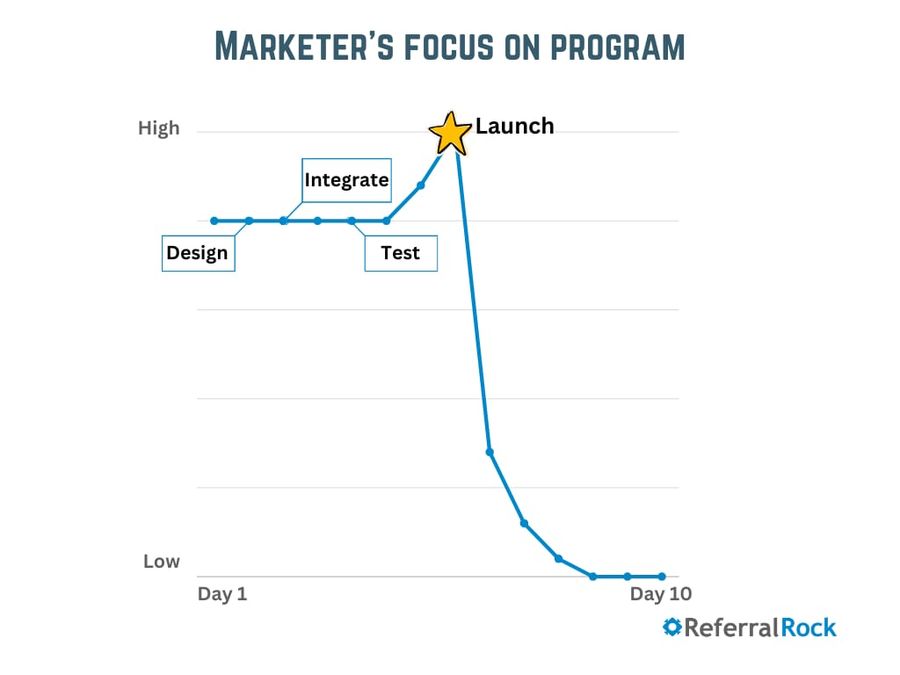
Software can't fix a business people don't recommend, a reward that doesn't fit your customers or a referral path with too many steps. It won't promote itself, either. We looked at 952 programs on our platform over 9 years (published November 2025). 82% of the ones that stalled stopped for one reason: the promotion dropped off after launch.
Are you ready for a referral program?
A referral program amplifies the word of mouth you already have; it doesn't create it. So before comparing tools, check there's something to amplify, and that now is the right time. Our readiness check walks through six signs in a few minutes:
- Your customers already recommend you.
- They're happy to say they use you.
- They know people who need what you sell.
- Your team cares how things turn out.
- Your software tracks sales.
- Your marketing brings in new customers.
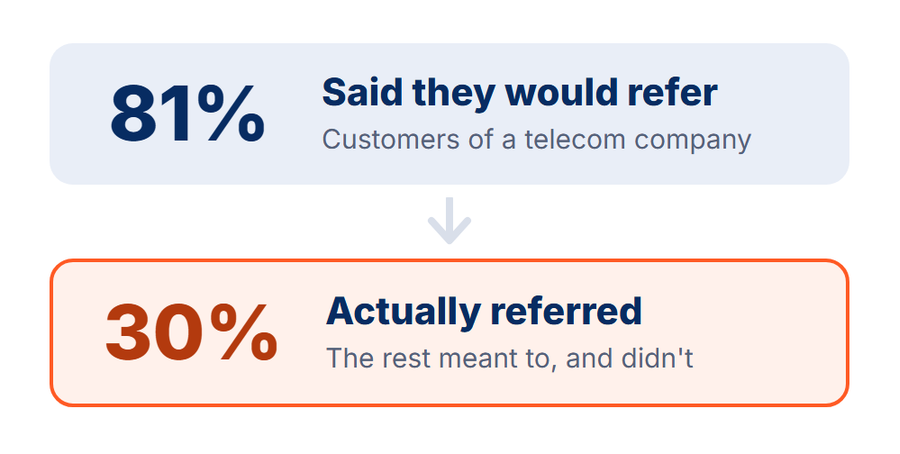
Why bother with a program at all, if people already talk? Because happy customers mean to refer far more often than they do. In a Harvard Business Review study, 81% of a telecom company's customers said they'd recommend it, and 30% actually did. What a program does (the ask, the reward, the wording, the reminders) changes how many customers refer.
Some businesses tell us they need to get a CRM first, and that's a fair reason to pause. Referral software ties into the system that records your customers and sales. Without one, the tracking is by hand. Some businesses also face rules on referral rewards, so check what's allowed where you are before you shop.
It's probably not the time to buy software yet if:
- You're brand new, or you have a handful of customers you know by name. Ask them yourself and track it in a spreadsheet for now.
- Customers won't mention you in public. Few people tell friends about their bankruptcy lawyer.
- You need a launch waitlist or a giveaway. A campaign tool fits a one-off push better (see the 6 kinds below).
- You hope it will do the marketing for you. A program needs someone with time to read the reports and keep the asking going.
Build, buy or a spreadsheet?
You can run a referral program three ways, and each fits a different stage. The question isn't only what it costs to start, but who keeps it running every week, because that becomes somebody's job.
| Option | Good for | The catch |
|---|---|---|
| Spreadsheets | A handful of referrals a month, one person in charge | Every referral, update and reward is done by hand, and it lives in one person's head |
| Custom build | Referrals that live inside your own app, engineers on staff, a reward that's a credit in your own product | Someone has to keep it running and fix it, and that's not their main job |
| Referral software | A steady flow of customers, sales that happen off your website, a team that asks | A monthly cost, and a tool to learn |
Patching together tools you already have (a form, your email tool, a shared sheet) works much like a spreadsheet. It's cheap to start, and every step still runs by hand.
SIR Glass, an auto glass company in Portland, Oregon, ran its partner referrals on Google Sheets and Forms. Partners couldn't see their referrals, and gift cards went out by hand. Then it moved to software.
SIR Glass now gets 30+ new sales a month from partner referrals, and saves an estimated 3 to 4 hours of manual work a week.
If you're using a spreadsheet or hacking together homegrown tools, our tracking guide lists the signs you've outgrown it.
What should I look for in referral software? Start with what you sell
Pick software that matches what you sell and how often people buy it. Those two decide what the software has to track. It might be a code at an online checkout, a deal in your CRM or a job your team finishes.
This is how we sort it, from what we see across our customers, not a study. Find your row, and you'll know which steps below need the closest look on a demo.
| What you sell | Examples | What the software has to handle |
|---|---|---|
| Lower price, bought often | Subscriptions, online stores, wellness | A link or code that works at checkout, a reward in store credit or a discount, lots of customers added automatically |
| Higher price, bought often | B2B software (sold to other businesses), financial and professional services | Referrals that turn into deals in your CRM, leads routed to the right sales rep, your team asking clients, a personal reward for the person who referred (not their company's account), updates to the sharer through a long sale |
| Higher price, bought once | Home services, solar, real estate | Referrals that arrive by phone or at a quote, leads routed to the right rep, your team asking on the job, a reward when the job is done and paid |
| Lower price, bought once | A single car wash, a quick one-time repair | A reward plus software often costs more than the new customer brings in, so a program rarely pays its way |
Who you want referring decides the kind of program, and the reward follows from them, not the other way round. Customers who refer friends need a customer referral program. Partners who send work need payouts per partner, and outside promoters need affiliate software. Plenty of businesses end up with two programs, customers and partners, so ask whether a tool runs both side by side.
Picture these 7 steps for a new customer
Referral software has to fit the way customers deal with you, and the systems you run on. Once it's set up, it works in the background as a system. So the best test before a demo is to picture it from your customer's side. Feature lists look alike, and this is where tools differ. Any step the software can't run becomes a job for your team, or a place referrals go missing.
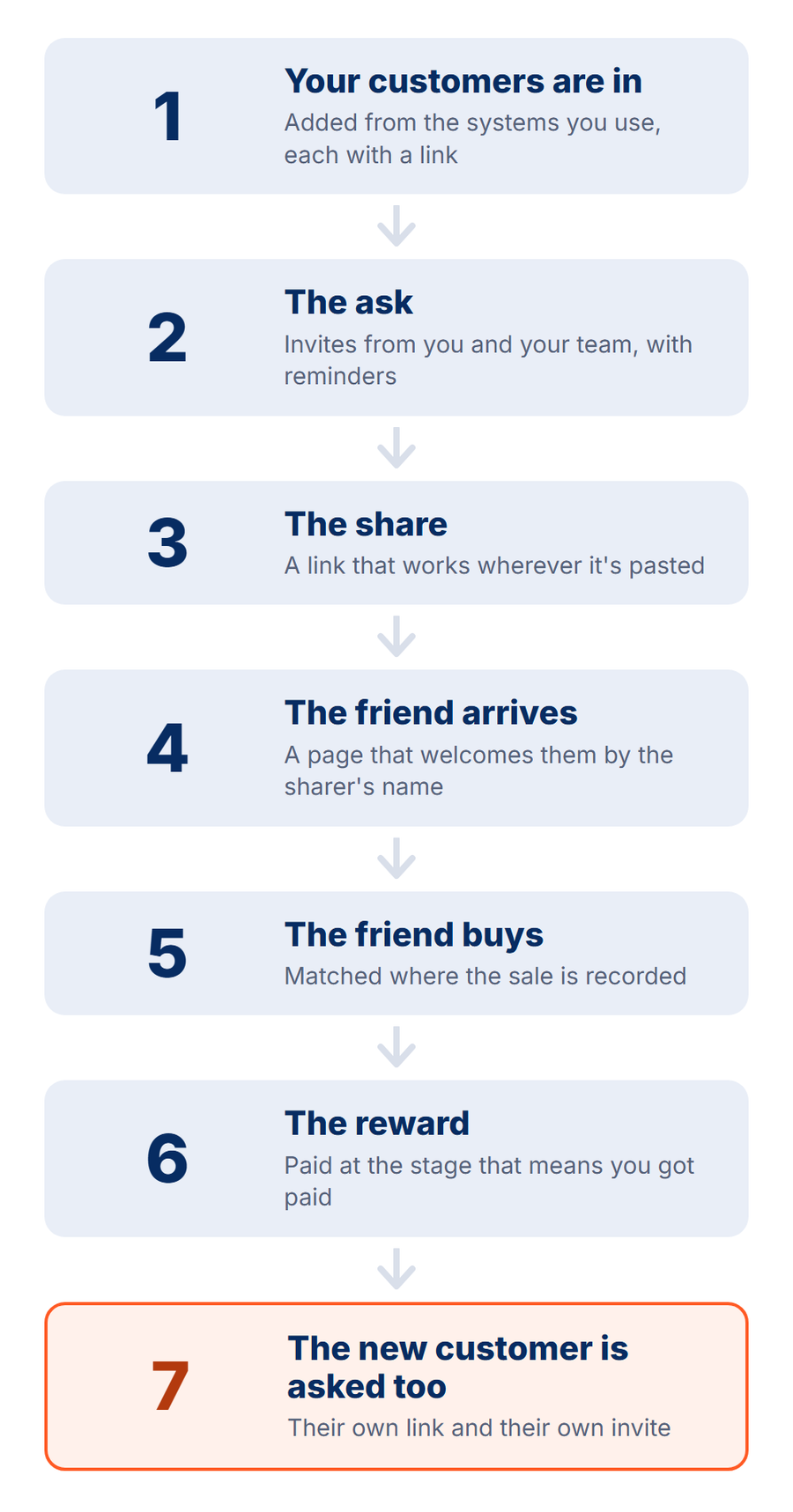
Take a recent customer and walk through these 7 steps, from the day they buy to the day their friend becomes a customer too. Each step says why it matters, what the software should do and what to ask on the demo. The answers feed straight into the scorecard below.
1. Your customers are in
Every customer needs a way to refer, starting with the ones you have. The software should add them from the systems you already use (your CRM, store, booking or billing tool), each with their own link. Then it should keep adding new customers soon after they buy, when they're most likely to share. We call that stretch the sharing window.
Ask on the demo:
- Can you add customers automatically from our existing systems?
- How do our existing customers get in, and does each one get a link?
- How are new customers added after they buy, without someone uploading a list?
2. The ask
The ask is the moment someone invites a customer to refer a friend. Customers rarely do it unprompted, even the ones who love you, so the ask is what turns good intentions into shares. Two kinds of ask work together: your emails and your team. The software should send the invite and a reminder or two automatically, from your name and your email address.
The invite should lead with what the friend gets, with the sharer's reward as a thank-you. Then the sharer is handing a friend a gift, which feels easier than asking a favor.
If your staff talk to customers, their ask is the most personal one you have, because people remember great service from a person. Think of a tech finishing a job, or the front desk at checkout. Your staff need a way to add a customer to the program right there, track their own referrals and get credit for them.
The software finishes the job with the link and the follow-ups, so nothing rests on a busy person's memory. If staff are already paid commission on the same sale, decide upfront whether a referral reward stacks on top.
Ask on the demo:
- Can you invite customers automatically, with reminders?
- How much control do we have over the emails: the wording, the look and our branding?
- Do you have tools for our sales reps and staff to sign customers up and track their own referrals?
- Can we see who on the team brought in each referral?
3. The share
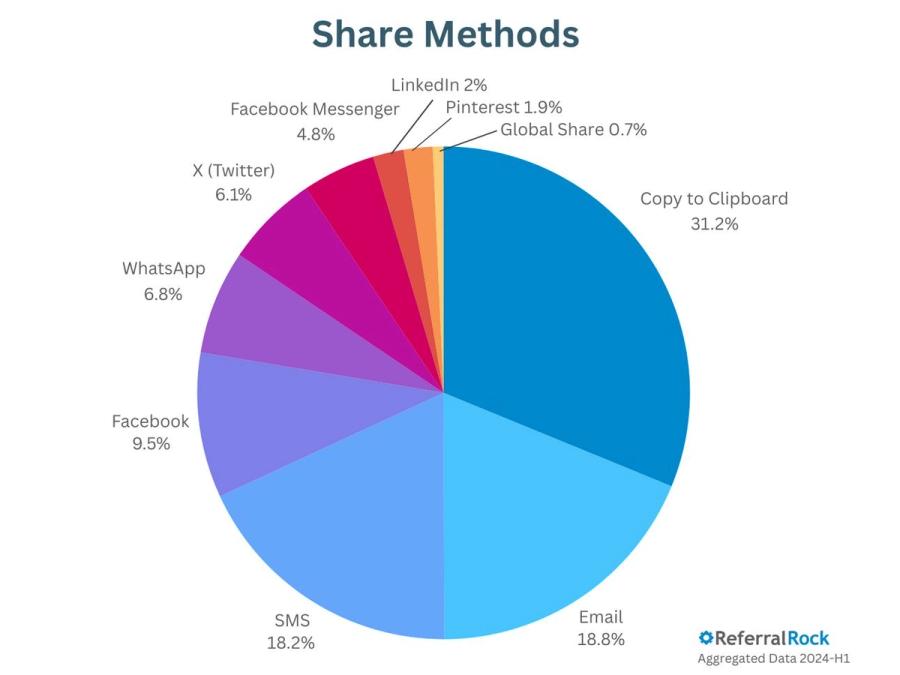
People share in different ways. Some text a friend, some send an email, and many copy a link and paste it wherever they're already talking. The software should support them all, with a link that works wherever it's pasted. It shouldn't ask a sharer to make an account, download an app or remember a password first. Every customer should already have a link.
Sharers lose their links, too. A good tool sends a fresh one with each reminder, so nobody has to call you to ask for it.
Ask on the demo:
- What does a customer have to do to get their link? Show me on a phone.
- Which ways can they share: text, email, a copied link, social media?
- How does a sharer find their link again, without a password?
4. The friend arrives
A referred friend is meeting your business for the first time, on the word of someone they trust. The page they land on should feel like a welcome. It greets them by the sharer's name, shows their offer, gives them a quick form to claim it and credits the sharer. The message the sharer sent should match what the page says, so the friend knows they're in the right place.
The page is a welcome, not a sales pitch. Many friends are curious but not ready to buy yet, and a short form keeps them. In our November 2024 review of 339 programs, 42% sent friends to a homepage or a checkout form instead.
There might be someone that just calls in. They might have received, like, a referral email, but don't actually use their link or code at all.
Not every friend clicks through. Some call, switch to another device or walk in. Once the form has a name and an email, those can still be matched to the sharer.
Ask on the demo:
- What does the friend see when they click, and how is it tailored to them and the sharer?
- Does building or changing that page need a developer?
- If a friend calls us instead of filling in the form, how does that referral get counted?
- What do you recommend we put on this page?
5. The friend buys
The sale is when a referral pays off: it's when the reward is approved, and when the sharer should hear the good news. So the software has to know when a friend buys. First, decide what event counts as buying: a paid order, a signed contract, a booked job or a closed deal. Then find the system that records it, such as your online store, booking tool, field-service software or CRM.
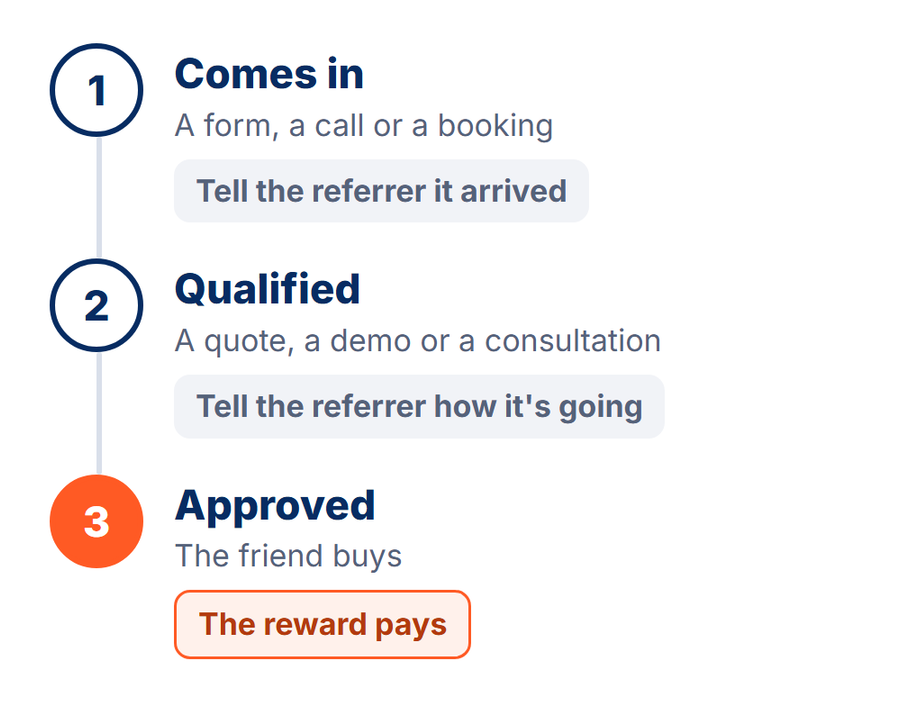
The software should read that event, match it to the friend's name or email and update the referral by itself. The sharer sees the news, and rewards go out only on real sales. At SIR Glass, a partner's referral goes into its job software as pending. It moves to qualified at the quote and is approved when the customer buys.
Decide who checks a referral is real before anyone is paid. The software should catch the basics: people referring themselves, the same friend referred twice, many referrals from one address. Plenty of businesses review rewards in a batch at first, then let them run.
Ask on the demo:
- Show me a referral moving from our form to a closed deal in our CRM, with nobody typing it in.
- Which of our systems can you read sales from?
- How does the sharer find out their friend bought?
- How do you catch someone referring themselves, or the same friend twice?
6. The reward
Reward when you get paid. Pay on a lead and you invite fake leads, which opens the door to fraud. Pay only at final delivery on a long sale and the reward can land months later. By then the sharer has lost interest and wonders if you'll pay at all. So pick the stage that means you got paid, or that comes after your return window, and check your system records it.
That choice is also your best fraud protection: when a reward needs a real purchase, there's little to gain from gaming it. Rule-based checks catch the rest.
Pick rewards your customers care about: a gift card, cash, a discount, or credit for a sharer who pays their own bill. The software should send them automatically. Many gift card services need a balance you top up first, and some tools take a fee on each payout. For money rewards, ask how the tool handles tax paperwork, and check with your accountant.
Give the friend something too. In one field test, a free month for the friend brought in nearly three times as many customers as one for the referrer. Then tell both people what's happening along the way. Looking forward to a reward motivates as much as the reward itself, so tell the sharer the day their friend comes in.
Leave room to grow, too. You may want different rewards by product, or a bigger thank-you for a sharer's third friend, a year from now. If your field limits rewards (healthcare, dental, legal), check the software can run a friend-only offer, a small thank-you or no reward. Run it past your compliance team. More in our referral rewards guide.
Ask on the demo:
- How do we set the reward to go out at the stage we pick, after our waiting period?
- What happens to a reward if the friend gets a refund?
- Which reward types can you send, and what fees come with each?
- Can we reward both the sharer and the friend, and add more complex reward rules later?
7. The new customer is asked too
Once the friend becomes a customer, they're a new customer like any other, so they should get their own link and their own invite. People who came in through a referral make good sharers. In a field test at a cashback app, a reminder worded "You were referred in – now refer your friends!" raised referrals 21%. This loop won't run on its own forever, but it does keep the flow topped up.
Ask on the demo:
- When a referred friend becomes a customer, do they get their own link automatically?
- Does the program know they're already in?
What are the requirements for referral software? A checklist
Referral software requirements fall into three groups: must-haves for every business, nice-to-haves, and ones that depend on what you sell. Copy the table, add a column for each tool you're looking at, and score each one on the demo. Most rows match one of the 7 steps above.
| Requirement | Need it? | Ask on the demo |
|---|---|---|
| Works for businesses that sell what you sell | Must-have | Can you show me a customer like us? |
| Adds your customers from the systems you use, each with a link | Must-have | How do new customers get in after they buy? |
| Customers share without making an account | Must-have | Show me how a customer gets their link, on a phone |
| A page for the friend that welcomes them and catches who they are | Must-have | What does the friend see, and what do they fill in? |
| Rewards for the friend and the referrer, at the stage you choose | Must-have | Can the reward fire at our stage, after a waiting period? |
| Pays rewards for you (gift cards, cash, credit) | Must-have | What fees come out of each payout, and who funds it? |
| Keeps both people updated on the referral | Must-have | What does the sharer hear when their friend comes in? |
| Ongoing invites and reminders, not one launch email | Must-have | What goes out in month 3 without us sending it? |
| Checks for fake or duplicate referrals before paying | Must-have | How do you catch someone referring themselves? |
| Reports on shares, reach and referrals, with an export | Must-have | Can I see where people stop, and export it? |
| Your data out if you leave | Must-have | What can we export, and what happens to live links? |
| Connects to your CRM or sales system both ways (referrals go in, sale updates come back) | Depends on what you sell (must-have if sales happen off your website) | Show me a deal in our CRM updating a referral |
| Counts referrals that come by phone, form or in person | Depends on what you sell | How is a phoned-in referral counted? |
| Your team signs customers up and gets credit | Depends on what you sell (must-have if staff talk to customers) | Can a rep sign a customer up on the spot? |
| Updates to the sharer at each stage of a long sale | Depends on what you sell | Can the program tell sharers when their friend's quote or demo happens? |
| Several programs (customers, partners, locations) | Depends on what you sell | Can two programs run side by side with one report? |
| A person who sets it up with you and stays on after | Depends on your team (must-have if nobody has run a program before) | Is our contact only for setup, or for as long as we're a customer? |
| Your brand on the pages, emails and web address | Nice-to-have | Do emails come from our name and our domain? |
| A free trial or monthly billing to start | Nice-to-have | Can we try it before a yearly contract? |
| A security review | Depends on your company (ask if it requires one) | Can you send your security documents for our review? |
During a trial, run the whole flow yourself. Refer yourself on a phone, open every email, fill in the friend's form, and mark the sale in your system. Any dead end, or a login you didn't expect, goes on the scorecard. Your sharers and their friends would hit the same snags.
What running it looks like in month 3 and beyond
Most buyers judge the demo on launch day. The harder test is month 3, when the novelty is gone and whoever set it up has other work. By then the program should run in the background like any other system in your business. These things should keep happening without anyone pushing them.
| What should be happening | What to check |
|---|---|
| New customers join on their own as they buy | The automatic adding from step 1 is still running, not a one-time import |
| Reminders keep going to customers who haven't shared | A light follow-up and a monthly note, without your team sending them |
| Your team keeps asking | You can see who on the team brought in referrals, so you can thank them |
| A report you can read in a minute | Shares, reach and referrals on one screen, plus an export for your own reports |
| You can answer a customer's question yourself | You can look up any sharer's referrals and rewards in a minute, without asking the vendor |
| Your time each week is small | A few minutes approving rewards, not an afternoon in a spreadsheet |
| You can change a reward or a message yourself | Rewards already earned keep the terms they were earned under |
| Help is there when you're stuck | Someone at the vendor answers your questions (more on that below) |
How will you know it's working? First check that customers take part at all, opening the emails and clicking the links. Then watch three numbers, in order. Shares: are customers telling people? Reach: are friends clicking through? Then referrals. We call these the leading indicators.
Referrals come last, so a program judged on referral count alone can look like it's failing in month one when it's only starting. Across all program types on our platform, one share reaches about 13 people and brings about 0.9 referrals (June 2024). So shares are the number to watch first.
No tracking of word of mouth is exact, and that's fine. The point is to see where people stop sharing, and fix that step.
Write a goal down before you sign, so you have something to check in month 3. Say how many customers you'll invite a month and how many you expect to share. Keep it realistic. You pay rewards only when a friend becomes a customer, so a handful of referrals a month can make the program worthwhile. Results build over months.
On our account reviews, the problems that show up later are rarely missing features. The person who set it up leaves, reps stop asking, or a manual step piles up until nobody does it. A tool that runs the routine parts by itself survives all three better. More on that in how to automate a referral program.
What help should you get from a referral software company?
The help you get matters as much as the software. Much of a program's success is based on how you structure it, and is it setup to run long after launch. Ask each vendor what their help looks like before you sign:
- Is our contact there only for setup, or for as long as we're a customer?
- Who backs them up when they're away or busy?
- Who helps us connect our CRM and our other systems?
- Will they advise us on best practices, like the reward and the messages?
- Is support only a chat window, or can we talk to a person?
- When we have a question, who do we ask, and how soon do we hear back?
The demo is a fair preview. Ask whether the person you meet there, or someone like them, will still be around once you've signed. If you can't talk with someone on a demo when they're trying to sell to you, you won't be getting support after you've paid.
What changes as you grow
Think a year out before you sign. The tool that fits a pilot in one location has to keep fitting when the program works.
| As you grow | Ask now |
|---|---|
| More customers in the program | How does the price grow: by customers in the program, by referrals, or by a cut of each sale? |
| More locations or teams | Can each location run its own program, with one report across all of them? |
| A partner program next to the customer one | Can two programs with different rewards run side by side? |
| A new CRM | Does it connect to the other systems we might move to, and how hard is the switch? |
| The person who set it up leaves | Will someone help the next person pick it up? |
| You decide to stop | Can we export customers, referrals and rewards, and what happens to live links? |
FeedXL, a B2B software company in Australia, launched a customer program and a partner program at the same time.
Together, FeedXL's two programs brought 216 referrals in the first 4 months, from 168 customers and 26 partners.
If we did pay annually and we decided halfway through the year that it wasn't working out, do we forfeit the second six months of the year?
That's the right thing to ask before signing. Get the answer, and the cancellation terms, in writing.
How much does referral software cost?
As of November 2026, small self-serve referral tools start under about $150 a month. Enterprise platforms run about $1,000 or more a month, usually on yearly contracts. Most growing businesses land in between, at about $150 to $999 a month.
I just want to make sure that we're not starting the call and then at the end, it's like, I'm an enterprise client and it's $5,000 a month.
Fair enough. Look for a published price, or ask for the number on the first call. Tools charge in five main ways: a flat monthly price, per customer, per referral, a cut of each sale, or a quote. The table shows what to expect in each price band.
| Price band | How you buy | What to expect |
|---|---|---|
| Small tools: under $150 a month | Self-serve, by card, start today; billed monthly | You set it up from help docs. Contests, waitlists and store apps: fine to test with, outgrown once a team asks or sales happen off your website |
| Mid-range: $150 to $999 a month | Self-serve or a short demo, a free trial is common; monthly or yearly | Where most growing businesses land. Setup help varies most here, from help docs only to a person who sets it up with you. Ask what's included (setup help, payouts, email) and how the price grows |
| Enterprise: $1,000+ a month | A sales process and demos, often a security review (a check of how the vendor protects your data); usually yearly | A team may run it with you. Deep custom work and many programs; weeks of signing before you launch |
| Price not public: after a call or a form | A sales call first; the contract varies | Setup and help vary. Budget the time to get a number, and ask for every fee in writing |
The bands are rounded, from vendors' published pricing as we checked it in November 2026. Prices change often.
The plan price isn't the whole cost. Add the rewards themselves, fees on payouts, any cut of each sale and any setup fee. Then add the extras: a CRM connection, more programs, more users, and the plan for any extra app needed to pass data between your systems. For what it's worth, Referral Rock sits in the mid-range at $250 a month, with a Scale Plan for businesses that need more volume.
What results look like
Ask every vendor for results from businesses like yours, with a time frame, in the customer's own words. A single average across every kind of business tells you little about yours. Here are a few of our customers' published results. They're their results, not a promise of yours.
| Company | What they run | What happened |
|---|---|---|
| Grover (electronics rental, online) | A program built into its website and emails, with a discount for the friend | 4 to 5 new customers a day, without building anything in-house |
| Catapult (staffing, UK) | Candidate referrals, moved off spreadsheets | 4,500+ referrals in its first 6 months, with £20 per qualified referral |
| SIR Glass (auto glass, US) | Partner referrals tracked in its job software | 30+ new sales a month, 3 to 4 hours of manual work saved a week |
| FeedXL (B2B software, Australia) | A customer program and a partner program | 216 referrals in its first 4 months |
10 red flags when choosing referral software
- A cut of every sale. Your cost grows with every referral, and a big deal costs the most. That's normal for affiliates; for a customer program, ask why.
- Rewards paid on leads, not completed sales. Paying when a friend fills in a form invites fake leads. The reward should wait for a real sale.
- Fees on payouts, or no clear answer about them. Ask what comes out of a $50 reward before it reaches your customer.
- Tracking by link only, when you sell by phone or in person. Those referrals will go missing, and so will the rewards your customers expect.
- A sign-up wall before a customer can share. Every extra step between a sharer and their link means fewer shares.
- No clear answer on who owns your customers. Ask whether the vendor will ever contact your customers directly. Their details, and the relationship, should stay yours.
- No help with setup. Most of the work is the decisions (the reward, the stage, the messages), not the software. A person who has done it before saves you the trial and error.
- No demo with a person before you buy. If nobody will talk to you before you sign, picture the help you'll get after.
- A year's contract before you can try it. A trial or a monthly start lets you see referrals move before you commit.
- Reports that only count referrals. You need shares and reach too, or you won't know which step to fix.
The 6 kinds of referral software, and which one fits you
Referral software comes in 6 kinds, each built for a different job. Picking the right kind matters more than picking the right brand. Each row below links to the matching section of our alternatives hub, where the tools in that group are named and compared.
| Kind, and what it's built for | When it fits | How it's usually sold |
|---|---|---|
| General-purpose referral builders: any business, no code | A good fit if you want one program across your website, your CRM and your team. The wrong shape if you need a waitlist or contest for a launch. | Published price, often a trial; differences show in setup help, CRM depth and how the price grows |
| Ecommerce and online store platforms: online stores, with the program built around checkout | A good fit if people buy from your store online. The wrong shape if your customers arrive through forms, calls or bookings. | Store apps and self-serve plans |
| Enterprise and managed platforms: large companies, with a team that runs it alongside you | A good fit if you need deep custom work and a managed service. The wrong shape if you want to start this month or see a price first. | Quote only, a sales process, a yearly contract |
| Built for one market: one industry, like in-app referrals for software or field crews for home services | A good fit if you're in that market, but check it has the core features too; some don't. The wrong shape if you're not in that market. | Varies |
| Campaign and launch tools: waitlists, contests and giveaways | A good fit if you need a burst for a launch. The wrong shape if you want referrals every month. | Low monthly price, self-serve |
| Affiliate and partner tracking tools: outside promoters who sign themselves up and earn commission | A good fit if the people promoting you are affiliates or influencers. The wrong shape if they're customers you already have. | Self-serve plans; some take a cut of sales |
Loyalty software and review software aren't referral tools either. One pays back repeat buyers, and the other collects reviews.
Referral Rock is a general-purpose builder. We don't do waitlists or leaderboard giveaways, so for a launch campaign, a campaign tool covers ground we don't. The same hub also has one-on-one comparisons of named tools.
Where Referral Rock fits
Referral Rock is referral program software for businesses with teams. It's built for service businesses, B2B companies and ecommerce brands, where sales, support and field teams earn referrals by taking great care of customers. Each person on those teams gets their own link and credit for every customer they bring in. Native integrations, including HubSpot and Salesforce, record each referral as the deal moves.
Every plan comes with a program advisor at no extra cost. Your advisor sets the program up with you, then stays with you for as long as you're a customer: regular check-ins, strategy and best-practice advice, help from our technical team with your integrations, and answers when something doesn't look right.
The Operator Plan is $250 a month, month to month, with a 30-day free trial. The Scale and Multi-Org plans are also available.
It isn't the right fit yet for a business with no word of mouth to build on. It doesn't run launch waitlists or contests. It's also the wrong shape for small one-off purchases, where a reward costs more than the new customer brings in.
How to choose referral software that fits your customers
Before your next demo, think of someone who just bought from you and picture them going through the 7 steps. How do they get in, get asked and share? How is their friend welcomed, the sale confirmed and the reward sent? Does the new customer get asked too? Then score each tool on the checklist.
Then picture month 3 and a year out. The right software is the one where every step has an answer you've seen work on the demo. Whichever tool you pick, the asking is still yours, and the software makes it easier for you and your customers to keep doing it. For the rest of the setup, see how to build a referral program.

About the author
Founder and CEO
Josh founded Referral Rock in 2014 and has spent more than a decade studying how and why people recommend the businesses they love. He writes about reward design and the human side of a recommendation.