
Looking for a way to lighten the load of your customer support or IT team? Help desk software has you covered. Help desk software assists you in categorizing, tracking, prioritizing, and managing customer queries.
This way, your business can pinpoint customers’ exact needs, answer customers’ questions accurately, and solve customers’ problems quickly and efficiently, leading to increased customer satisfaction. By automating parts of the process, it also helps reduce the time your employees spend answering common questions.
But choosing a help desk software can be difficult, so it’s important to establish what factors are most important in selecting the best help desk software for your business, as well as what goals your business hopes to accomplish with the software.
Which help desk software features do people value most, and how exactly can help desk software assist in maximizing your productivity? We ran a survey to find out, and 16 marketers shared their insights. We cover them below, along with overviews of the different help desk software programs that marketers told us they use in their own businesses.
One thing was clear: All 16 marketers believe help desk software has helped in scaling their business. Let’s dive into the statistical insights and short answers we gathered.
First, let’s dive into the statistical insights and short answers we gathered.
Choosing a help desk software: Customization is key
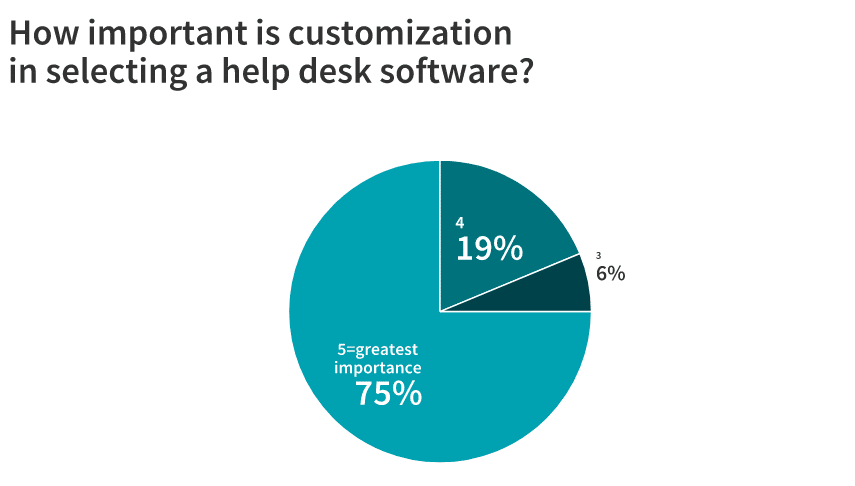
When we asked marketers how great a factor customization was in the decision to choose a help desk software, the majority told us that it was extremely important. Marketers were instructed to rate the importance of customization on a scale of 1 to 5, with 1 indicating least importance and 5 indicating greatest importance. 75% of the marketers said customization was of greatest importance in their decision, rating it a “5.” 19% rated customization’s importance a “4,” or very important, and 6% rated its importance a “3” or somewhat important. No marketers rated customization’s importance a “2” or a “1,” so customization was at least somewhat important to all the marketers we surveyed.
We also asked marketers about the features they customized within their help desk software. Here are their responses:
Zendesk Support: Dashboard and chat widget; customer support; shortcuts feature; macros, which eliminate repetitive tasks
“The key feature is the shortcuts feature, which essentially allows us to customize the automated responses we generate for certain inquiries. We’ve done a lot to do this, but still have room for improvement.”—Maciej Baranowski, ResumeLab
Freshdesk: Entire support portal
“We’ve customized our support portal to reflect our branding and provide a professional look for clients needing support.”— Sacha Brant, Brand Scrubbers
Zoho Desk: User chat/instant chat
“We have customized the instant chat widget, as we can’t answer our customers right away. We work with emails.” —Eric Jayden Anderson, El Mejor Trato
Help Scout: When certain help desk answers and chat options appear
“A key feature is the ability to show certain help desk answers and live chat vs. ticketed chat to customers vs. non-customers.” —Jon Hayes, Authority Hacker
Review reporting
In the world of help desk software, review reporting involves the types and amounts of metrics that a given help desk tracks and compiles. These metrics include the number of tickets received and resolved; customer satisfaction; the average time to respond to tickets; and the average time needed to resolve a request or incident. Surprisingly, though, the metrics that help desks report can vary greatly—so check each help desk you’re considering to see if it tracks the metrics essential to your business.
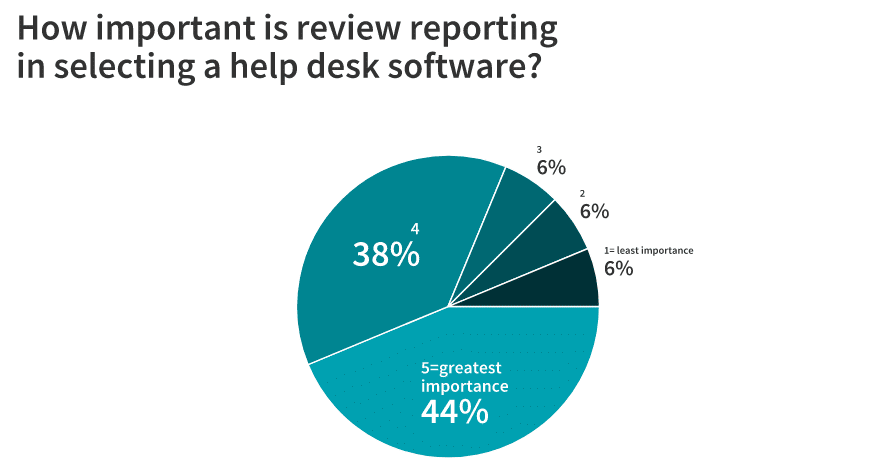
We asked marketers how important review reporting was in their decision, using the 1-5 scale of 1 indicating least importance and 5 indicating greatest importance. 44% of the marketers said review reporting was extremely important in their decision, as they rated its importance a “5.” 38% rated review reporting’s importance a “4,” or very important. 6% each rated its importance a “3” (somewhat important), “2,” (not very important) or “1” (of least importance).
Social media monitoring
Social media monitoring features allow your customer support team to import, track and answer questions that customers post on Facebook, Twitter, and other platforms. It tracks brand mentions and questions on social media and allows your brand to convert these public queries into standard, private help desk tickets, so customer support is just as efficient on social media.
We asked our marketers whether the help desk software they use monitors questions from social media. 44% said yes, 50% said no, and 6% said they were not sure. (Interestingly, we sometimes received “yes” and “no” answers in reference to the same software. So, these results might be more reflective of whether companies choose to use social media monitoring, assuming this feature is present in the software they use.)
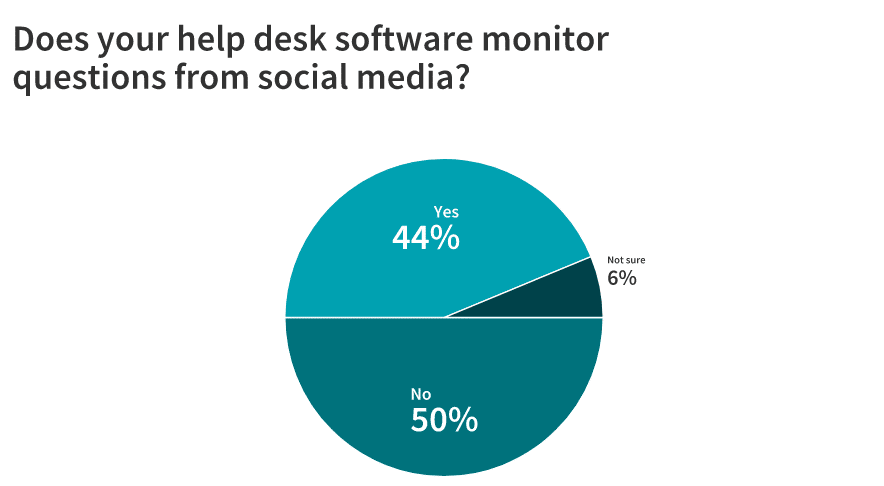
So, if social media monitoring is important to your business, you’ll want to choose your help desk software carefully: it’s a common feature, but not a standard one.
Examples of software that does monitor social media: Zendesk Support, Zoho Desk, Freshdesk, Salesforce Service Cloud (when connected with Salesforce Social Studio).
Examples of software that does not monitor social media: Manage Engine, Help Scout.
Top team goals when selecting a help desk
It’s essential to establish the goals that you want your help desk software to meet. That way, you can determine which features are most essential for accomplishing these goals and delivering the optimum customer experience. What were our marketers’ top goals in selecting the best help desk software? Let’s find out.
Increase overall customer satisfaction
Maciej Baranowski of ResumeLab shares overall customer service goals that factored into the choice of help desk software: “Our top 4 goals are to provide excellent customer service; increase customer satisfaction; monetize users who have issues with the product – such as those who canceled or did not purchase; and build brand reputation.”
Offer simplicity
Shayne Sherman from TechLoris responds, “Our main goal was something that allowed our users to create and submit tickets to our technicians in the most simple manner. The interface needed to be intuitive for our employees to use and detailed enough that we could get the tickets to the right people as quickly as possible. Nothing’s worse than creating a ticket only to have it sit in the ether because the system isn’t sure who to assign it to.”
Identify patterns in pain points
Grace Montealegre from Persist Communications says, “We wanted a way to see patterns in issues experienced by our software users/clients so we can pivot and/or adjust via a continual improvement process on the software product. And, a place where a knowledgeable base can be built up for both the support team and users/clients.”
Improve communication
Maria Cruz of smallbiz.tools responds,“We want to make sure we’re in constant communication with our customers and readers. If they have any issues, we want them brought to our attention immediately so we can monitor things successfully. We also want the process to be easy on both sides. We want to keep an efficient eye on tickets among team members and for customers to know their concerns are heard and being worked on.”
Better manage customer support’s time
Says Sacha Brant from Brand Scrubbers, “When selecting a help desk, it’s crucial to our team that it decreases the amount of time we’re spending on remedial tasks. Our goals are to ensure whatever help desk we are working with is increasing the amount of time we spend on projects and that no support request or inquiry is missed.”
Jon Hayes of Authority Hacker responds, “Our initial goal was the ensure that we minimize our refund requests by being able to identify bottlenecks in our customer support offering. By upping our customer support game, we have been able to significantly lower the number of refunding customers.”
Streamline tasks
Nathan Ripley of Maid Just Right shares, “In selecting a comprehensive and solid Help Desk software, my team and I are looking for ways to streamline our various tasks into a single point of access. By doing so we save time, increase productivity and inter-team communication.”
The top 6 help desk software
Based on marketers’ responses, we’ve compiled a list of 6 of the best help desk software programs, to help you compare features and choose the software that you think will work best for you. We’ve also included the marketers’ comments on how each help desk software maximizes their productivity, to aid you in your decision. Keep in mind that there are many other help desk software options as well—for this roundup, we’ve chosen to list only software programs recommended by the marketers who took part in our survey. Here’s our list, in no particular order.
Zendesk Support

Zendesk Support describes itself as a “beautifully simple system for tracking, prioritizing, and solving customer support tickets.” This popular software is dynamic and highly customizable, works with over 500 integrations, and is designed to fit and grow with any business, regardless of size. Multi-channel support allows customers to start a conversation on the platform that works best for them, with all conversations routed to Zendesk.
Plans and Pricing: 5 plans; prices range from $5 (per agent per month) for the simplest Essential plan, to $199+ per agent per month for the most robust Elite plan.
Free trial offered?: Yes
Notable features:
Automation: Quickly handle a ticket with predefined, customizable responses and actions for frequent inquiries. If you also choose to purchase Zendesk Guide, you can activate Answer Bot, which directs users to a relevant knowledge base article instead of creating a ticket for customer support. “Skills-based routing” automatically assigns tickets to the support team member best equipped to handle them; ticket workflows prompt the best courses of action based on how the ticket is categorized. Macros help eliminate repetitive tasks.
Language customization: Over 40 languages are available; ticket content can automatically be translated into a customer’s language.
Contextual workspace: Display information and tools based on the information in a ticket. According to ZenDesk, “each contextual workspace will display the relevant ticket form and macros that pertain to that ticket, and allow you to pre-select apps to have expanded and collapsed.”
Personalize ticket view: Customize the view of each ticket “based on status, assignees, or other conditions” so you only see the information you need, and can manage the ticket productively. You can also customize macros for given types of tickets, based on your personal flow of managing tickets, and view the history of requests made by the customer who submitted the ticket.
Manage multiple brands: For larger businesses, Zendesk Support allows you to set up distinct help desks for multiple brands within your company, for different products/product categories, or for each region your company serves—with all data managed under a single account.
What experts have to say:
“Zendesk Support includes a ticket management system that is quite versatile and flexible. It offers support across multiple channels, and it also features high-level analytics and reporting capabilities. What’s particularly beneficial is that it allows you to create communities and create appropriate forums, to where your customers can actually help solve problems for other clients in a group sort of fashion. And inside that community function, customers can comment and look for particular keywords in a so-called smart fashion and provides access to frequently asked questions along with corresponding answers. It also syncs rather seamlessly with other necessary business products such as customer relationship management.” –David Bakke, Money Crashers
“It’s great because it houses all of our information and interactions with customers in one place. It essentially streamlines everything and presents it in an organized way on the dashboard.” –Laura Gonzalez, Audi Bellevue
“After we started using Zendesk Support, our first reply time went down from 10hrs to 4hrs and the satisfaction rate went up to 92%. The numbers tell the whole story, but here’s a little bit more insight into it. The best feature we use is Answer Bot. This answers the inquiries automatically when a user reaches out to us. It gives you an article that can help you with your inquiry instead of making a ticket for us. Almost 15% of all users engaged with help center articles thanks to answering bot recommendations before one of our agents even needed to handle the ticket.
“Help center helped decrease the number of inquiries we get because most of the topics are covered online. So, let’s say people search for an article we don’t have. We then write the article. And then after this, we see a massive decrease in the number of visits to the help center.
“The advanced analytics portion was massive because we were able to know when customers were most likely to create tickets, so a certain timeframe for user activities. When you have a small support staff, like us, it was very important because it told us when we should have more people active and answering tickets during what time of the day.” –Maciej Baranowski, ResumeLab
Manage Engine’s Service Desk Plus

Manage Engine has offered Service Desk Plus, an IT-focused and ITIL-recommended help desk solution, for over 10 years, tailored to ITSM best practices. Primarily aimed at enterprise-level businesses, the service is used by Disney, Dell, Etihad Airways, and others. Manage Engine is a division of Zoho.
Plans and Pricing: Standard, Professional and Enterprise plans; pricing not available.
Free trial offered?: Yes
Notable features:
Categorization and Linking: Detailed categorization of tickets assists with quick assignment to the correct technician. Technicians can distinguish between incidents, problems, changes, and projects, and link these records together when needed, based on an ITIL framework.
Self-Service: Self-service portal lets users read service catalog templates and knowledge base articles, and submit tickets for self-service instead of submitting them to technicians, reducing the number of simple and repetitive requests that come directly to your IT department.
Automation: Automatically categorize tickets and assign them to the right technicians using business rules; evenly distribute tickets among technicians. As Service Desk Plus is a product of Zoho, users can integrate Zoho’s AI to automate the handling of frequent questions.
Life Cycles: Create visual request life cycles, with possible statuses or stages for a given request; conditional actions that must be completed before a ticket can move forward; and mandatory, contextual forms that collect only the needed information from end users, to increase technician productivity.
What experts have to say:
“Manage Engine’s ServiceDesk Plus gives us the ability to categorize our tickets to a great degree, to make sure they get to the right technician quickly. This way, problems are short-lived. The faster a problem is solved, the faster the affected employees are back to work.” –Shayne Sherman, TechLoris
Freshdesk
Launched in 2011, Freshdesk serves all sizes of businesses and customer support teams, from small business to enterprise, and allows queries to originate via email, chat, phone, social media, and your company’s website. This cloud-based help desk lets you customize a myriad of features, including support portal appearance, agent roles, ticket forms, and need segments of customers. HP, American Express, and NYU are among the 150,000+ businesses that use Freshdesk.
Plans and Pricing: 5 plans, ranging from a basic free “Sprout” plan with limited features, to the most advanced “Forest” plan for $109+ per agent per month, aimed at enterprises. Add field service management to the “Forest” or “Estate” (second-most advanced) plan for $29 per field technician per month.
Free trial offered?: Yes, free basic plan also offered
Notable features:
Automation: Automate repeated tasks so you can quickly move through ticket stages with one click, and use pre-formatted replies to swiftly answer common questions. Also, automatically suggest solutions to common customer problems instead of opening a ticket for your customer support team. Assign tickets to the best agent for the job automatically, based on ticket keywords or properties, agent skills, and/or agents’ current workloads. Time and event triggers automatically perform actions based on when an event happens.
Collaboration: Collaborate with employees across your company to solve specific parts of tickets, and share tickets with other teams while maintaining your progress. Meanwhile, make sure you don’t accidentally assign more than one person to the same ticket when it’s not needed, with “collision detection.”
Self-Service: In addition to the automated answer suggestions, a knowledge base and customer support forum let you help customers help themselves.
Ticket Merge/Divide: Link related tickets, and split more complicated problems into multiple tickets.
Gamification: A free, optional and customizable points structure lets your customer support team “level up” and unlock achievements based on assigned tasks, enlivening basic processes.
What experts have to say:
“Freshdesk provides a lot of useful insights and in-depth ways to work on tickets and communicate with team members. We’re able to collaborate with team members to work on tickets together and we have a team inbox to get through everything. FreshConnect also allows us to speak with experts about particularly difficult tickets. Something we find especially helpful is how customers can see progress on their tickets through Freshdesk without us having to update them manually. We’re also not limited to the ways we can get in touch with each other. We can manage communication and tickets through email, phone, chat, social media, and our website.” –Maria Cruz, smallbiz.tools
“Freshdesk maximizes our productivity by allowing us to streamline our support process. Instead of sifting through multiple emails for information, we have the ability to merge tickets so we can get a bigger view of the entire issue. Within Freshdesk, the power you have to organize and sort your tickets is endless. The ability to categorize tickets and sort by the last modified tickets has greatly increased our team’s productivity.” –Sacha Brant, Brand Scrubbers
“With Freshdesk, you can set up an ‘Observer’ rule – to tag responses as soon as a support member sends a response. For instance, you can tag a ticket with the term ‘feature’ whenever you use a canned response to a customer regarding feature requests. Automation is one of the most critical factors for scaling businesses. It allows you to speed up the support process and cut down on time spent by support team members on doing tedious, administrative tasks. And of course, more time to appease customers on queries that need time to spent on adequately. Freshdesk has been so great that it managed to support 15 million monthly users with solely one support person at one point in time.” —Hung Nguyen, Smallpdf
Help Scout

Help Scout offers “tools for the world’s most customer-centric business” in an affordable, customizable experience. The software connects with over 50 integrations. Values are a top priority for Help Scout, as they’re a Certified B Corporation.
Plans and Pricing: 4 plans: $12 per user per month for the Basic plan; $20 per user per month for the Standard plan; $32 per user per month for the Plus plan. Contact Help Scout for pricing for the enterprise-level Company plan. Messages and Advanced Security add-ons are also available for an added fee.
Free trial offered?: Yes
Notable features:
Beacon: Help Scout’s Beacon feature delivers answers to frequently asked questions in a pop-up window, based on the page that a user is on, allowing for detailed self-service. Beacon also offers users a choice between several live chat channels, email, and these automated answers. It only lets customers pick live chat if the support team is online (so the customer isn’t left waiting for an answer), and gives customers an estimated wait time if your support team is live chatting with other customers.
Knowledge Base Integration: With the Docs knowledge base, it’s even easier to help customers help themselves. Write knowledge base articles, then easily search them during a conversation with a customer and send the relevant article links during that conversation. Also, embed Docs articles anywhere on your website, or include them in Beacon.
Streamlined problem-solving: Tag team members for help in handling a ticket, enter pre-filled replies to answer frequently asked questions, and prevent duplicated efforts with collision detection. Automate common processes with “if/then” rules.
Help Scout for Good: Help Scout offers a significant discount to organizations dedicated to human rights, environmental sustainability, and serving underrepresented groups in tech.
What experts have to say:
“As we often launch our products during certain windows, it’s important that we have a piece of software that allows us to scale up and down depending on customer demand. By allowing us to set different ‘Beacons’ for each area of the site, for example, on the sales page, in our members area or simply on our blog, it means we can provide the correct type of support where it is needed. Help Scout allows us to easily do this and ensure that the right support ticket goes to the right person without the fuss around with assigning tickets, etc.” –Jon Hayes, Authority Hacker
Salesforce Service Cloud

Salesforce Service Cloud calls itself a “time-saving, relationship-building, joy-boosting machine.” This combined help desk and CRM platform offers a customizable, cloud-based suite of help desk features, including multi-channel support for requests made from mobile messages, web chat, social media and more. It also offers numerous integrations, such as integration with Slack.
Plans and Pricing: 4 plans: $25 per user per month for the basic Essentials plan, which supports up to 10 users. $75 per user per month for the Professional plan; $150 per user per month for the Enterprise plan, and $300 per user per month for the Unlimited plan. Several add-ons are available.
Free trial offered?: Yes
Notable features:
AI-Powered Service: AI chatbots help customers solve common problems thanks to their language processing, by recommending relevant answers and Knowledge Base articles. Einstein AI collects customer information for a quick handoff to agents; analyzes cases and fills in “case fields” (relevant ticket information), and recommends “next best actions” based on queries to increase the likelihood of further customer conversions.
Streamlined, automated support: Macros and “Lightning Flow” help customize and automate common workflows; cases are automatically matched to the agent with the best skill set for the job; keyboard shortcuts help with formulating quick responses; relevant Knowledge Base articles are automatically suggested to help agents quickly respond to a case.
Comprehensive customer-case view: Service cloud compiles all data on a customer across departments, including their history of support requests, context of their case, and knowledge base articles the customer has already read, to help you assist them faster.
Self-service: Create a fully customizable, branded, and mobile-responsive Knowledge Base, and embed Knowledge Base articles anywhere on your website, portal, or native app. Then, track which articles are effective, which may need improvement, and what new articles might need to be written. Customers can also help other customers find answers within the community.
myTrailhead add-on: myTrailhead offers the empowering, gamified customer support learning that Salesforce Trailhead is famous for, but tailored towards the needs of your brand, for continued training of customer support staff.
What experts have to say:
“My favorite thing about Service Cloud is that we are able to put in tickets directly into Slack in our service desk channel. From there, it creates a ticket that is automatically tracked and alerts you in Slack when updates have been made.” –Levi Olmstead, G2
Zoho Desk
Zoho Desk bills itself as “the industry’s first context-aware help desk software,” and includes a contextual AI. Its free basic plan and affordable higher-tier plans make it an ideal choice for small to medium-sized businesses. Zoho Desk can stand alone, or can integrate with Zoho CRM for a more robust set of features. Companies that rely on Zoho Desk include McAfee, Jaguar, and the University of Southern California.
Plans and Pricing: Free basic plan covers up to 3 agents. $12 per user per month for the Professional plan, and $25 per user per month for the Enterprise plan.
Free trial offered?: Yes; free basic plan also available
Notable features:
Zia AI: Zoho’s Zia, a “contextual AI,” lets customers ask it questions in a chat platform, then suggests Knowledge Base articles based on the words and context it “reads.” If users report that a solution Zia offers didn’t help them, Zia will let your managers know so the user can receive human support.
Zia can identify if a ticket contains positive or negative sentiments, tag tickets automatically (and learn from agents how to better assign tags), pinpoint the most common ticketed issues, and warn you if there’s a sudden spike in tickets.
Other Contextual Automation Tools: Ticket answers are prepared automatically based on context, complete with relevant articles from your Knowledge Base. Tickets are also automatically categorized based on priority, date due, or status.
Peek Button: With the Ticket Peek preview feature, agents can “peek” into tickets to quickly see a history of the submitting customer’s interactions, basic properties and contents of the ticket, and relevant Knowledge Base articles, with a single click. So, agents can move from ticket to ticket, and figure out the basics of their response, quickly and efficiently. Ticket Peek also employs collision detection, so it helps prevent multiple agents from working on the same ticket.
Multiple help desks or departments: Set up distinct help desks and self-service portals for multiple brands, or divide your help desk into multiple departments based on product type, subscription level, or business section.
What experts have to say:
“It helps understand a customer’s history of interactions and allow us to respond with more clarity and precision. Besides, we can tag colleagues in tickets, ask colleagues questions, and give answers. We want organization, collaboration, and efficiency. That’s all we need. And Zoho Desk is able to live up to our expectations.” –Eric Jayden Anderson, El Mejor Trato
“Zoho Desk helped me streamline my social media presence while making certain other features easy to use. Most of my time I’ve been spending navigating phone conversations and orders of clients, their email inquiries and social media. By using Zoho Desk all these tasks are almost effortless and they’re done in an instant. I don’t need to jump from one app to another, I can do it all from my phone in a single application.” –Nathan Ripley, Maid Just Right
Key takeaways
Help desk software can assist you in streamlining customer support or IT processes, and help you make your business scalable. However, the features each software service offers can differ greatly. So, make sure your team establishes clear goals for serving customers’ needs, and makes a non-negotiable feature list based on those goals, to assist you in choosing the right help desk for your needs.

About the author
Content Specialist & Referral Program Advisor
Jess has been with Referral Rock since 2019. She has been a critical part of our content team and has been responsible for writing, reviewing, and maintaining our content library as well as our product support documentation. She is meticulous in her research, writing, and review process. More recently she has helped review and draft referral program messaging for our customers. This has helped her create a unique feedback loop where she sees referral programs in action, helps launch them, and also contributes to our articles.



![12 Essential WordPress Page Builder and Design Plugins [Picked by Experts]](https://cdn.sanity.io/images/x9q04aql/production/ac079ca89ea53cc9762dc314b22c495be569f376-900x600.jpg?w=400&auto=format)