
Key takeaways
- A referral coupon involves a gift your customer gives a friend, not a discount you give the customer for selling. Frame it that way and conversion follows.
- Codes vs. links is really a friction question. Manual codes work to test demand; referral links scale because they remove the lookup, the spreadsheet, and the wait.
- What the sharer earns belongs in the sharer's dashboard, not in the friend's message. Mixing the two turns the gift into a transaction.
A referral coupon is a coupon your customer hands to a friend, and it does something a normal coupon can’t. It carries a recommendation. Someone the friend trusts is saying “use this,” which is why referred customers convert at higher referral rates than people who find the same offer in an ad.
But there’s a catch most setup guides skip: a referral coupon only works if it feels like a gift the customer is giving, not a payout the customer is collecting. That distinction shapes how you set it up, how you message it, and whether you should bother with a manual approach or go straight to software.
Here’s how referral coupons actually work, when each type fits, and how to set them up without breaking the gift.
What are referral coupons?
A referral coupon is a unique coupon (a code or a link) that a customer can share with a friend. When the friend uses it, they get a discount, store credit, or free product on their first purchase. The system also ties the coupon back to the customer who shared it, so the business knows who referred whom.
That second piece is what separates a referral coupon from a regular promo code. It’s two-sided by design: the friend gets something for trying you out, and the customer who shared it gets a thank-you when the purchase goes through. Both parties have a reason to participate, and the business has clean attribution.
Why referral coupons outperform regular coupons
A regular coupon is just a discount. A referral coupon carries a relationship.
Referred friends already trust their peer’s recommendation. According to Nielsen, 92% of people trust peer referrals more than any other form of advertising, so they’re primed to buy after a referral. The coupon is the small extra push that closes the loop, and the message that comes with it (“here, this is for you”) is what makes it land.
That framing matters more than the dollar amount. If you only reward the customer who shares, the friend on the receiving end starts to feel used: their buddy is getting paid to recommend stuff. The whole thing tips into transactional, and people quietly tune out. But when the customer can hand the friend a real gift and only afterward gets a thank-you on their own end, the dynamic flips. The sharer feels generous. The friend feels chosen. The purchase feels like a favor returned, not a sales pitch absorbed.
This is the Friend Factor, and it’s why referral coupons drive higher conversion rates and better revenue from your referral program than incentives aimed only at the sharer.
How to message a referral coupon
The most common mistake is letting the sharer’s reward leak into the friend’s message. Something like “Here’s $10 off, and I’ll get $20 when you buy” feels honest, but it pulls the friend out of “I’m getting a gift” mode and into “my friend is getting paid for this.”
Keep the two sides separate:
- What the friend sees: the friend’s reward, the sharer’s name, the value pitch. That’s it. “Taylor sent you $10 off your first order.”
- What the sharer sees: their own reward, in their dashboard, in the thank-you email they get after the referral closes. The sharer knows what they’re earning. The friend doesn’t need to.
The same handoff applies on the friend page. If the message says “Taylor sent you a gift” and the link drops the friend onto a generic promo page with no mention of Taylor, you’ve broken the trust transfer. The friend feels the seam and the click goes nowhere. The friend page should carry the referrer’s name, the same offer, and the same tone the message set up.
Two types of referral coupons: codes vs. links
There are two ways to deliver a referral coupon: a referral coupon code the friend types in at checkout, or a referral link that activates the coupon automatically. They sound similar, but they sit at very different points on the friction curve.
Referral coupon codes (the manual path)
With this approach, you generate a batch of unique codes (you can use our free coupon code generator for this) and assign one to each customer who participates. You register the codes in your payment or ecommerce platform, restrict them to new customers only, and track who has which code in a spreadsheet. When a friend redeems a code, you match it back to the original customer and send the thank-you reward manually.
This works for testing demand. If you want to see whether your customers will share a coupon at all before investing in software, a manual run of fifty customers will tell you. But the friction adds up fast: customers have to ask for their code, you have to look up who’s referred whom, and the thank-you reward depends on you remembering to send it. Every step you add between “I want to refer my friend” and “here’s my code” is a step where you lose people.
Referral links (the automated path)
A referral link does the same job without the lookup. Referral software generates a unique link for each customer, embeds the tracking inside it, and activates the coupon the moment the friend clicks. Attribution is automatic. Reward fulfillment is automatic. The customer doesn’t have to ask for anything, and you don’t have to reconcile a spreadsheet.
This is also where access opens up. Instead of customers signing up for the program one at a time, every customer can have a link by default. They use it if they want to. Some won’t, some will refer once, a few will refer constantly, and you don’t have to predict which is which. Open access is what lets the system find your superconnectors instead of filtering them out at the door. An automated referral program is what makes that possible without a heavy operations lift.
How to set up referral coupons in Referral Rock
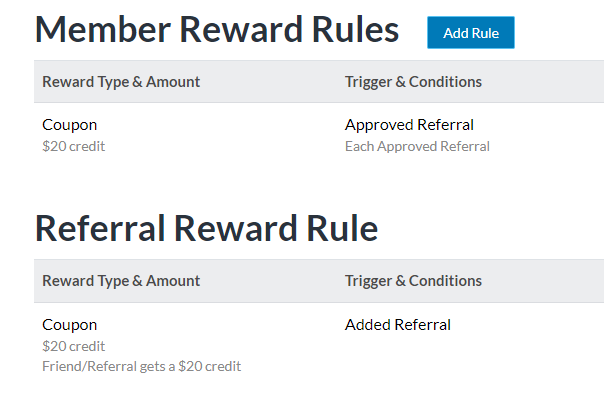
If you’re using Referral Rock, the setup lives in the Rewards tab of the Program Editor. You configure two rewards:
- The Member Reward: what the existing customer gets as thanks for a successful referral.
- The Referral Reward: the coupon the friend receives via the referral link.
For both, you’ll select Coupons as the reward type, set the value, and pick when the reward triggers (typically Pending status for the friend’s coupon, so it activates the moment they click, and Approved status for the customer’s thank-you, after the referral converts).
Note: When you create a coupon reward in Referral Rock, the reward amount is set to a fixed amount of one (1). This amount means that Referral Rock will issue one coupon, per recipient when a reward has been earned. You’ll set the values of coupons in your payment platform.
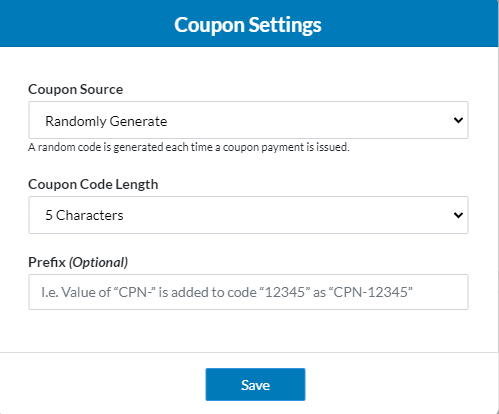
Then you’ll head to Rewards > Payouts to set up the actual coupon codes. You can let Referral Rock randomly generate them (we recommend at least 8 characters including any prefix), or import codes from your ecommerce platform like Shopify.
From there, the system handles the rest: codes go out automatically, attribution tracks itself, and rewards fulfill on schedule. Full step-by-step is in our support article on how to set up referral coupons in Referral Rock.
Setting up coupons that apply automatically at checkout
If you want the friend’s coupon to apply automatically (no typing the code, no checkout dropoff) Referral Rock supports two paths.
Option 1: Use your ecommerce platform’s built in discounts
Platforms like Shopify let you create a shareable discount link that applies a one-time coupon when clicked. (Here’s how to do this in Shopify.)
In Referral Rock, set the redirect URL on your referral program to that discount link, and the friend’s click does both jobs at once: it tracks the referral and applies the discount.
Option 2: Pass a static code through the referral link
With this option, a coupon is passed over someone’s referral link, and your web client takes it and automatically adds it to your checkout page. Here’s how that process typically works:
Add a URL parameter for a static coupon code to the redirect URL. When the friend clicks the referral link, the code passes along in the URL, and your site picks it up and applies it at checkout. This requires a small build on your end, but it gives you full control over the coupon experience without depending on platform-native discount features.
Run the program, don’t just launch the coupons
A coupon code on its own is a discount. A referral coupon is a small system: a gift, a handoff, a tracked recommendation, a reward. The mechanics are the easy part. What separates programs that actually move the needle from ones that fizzle is whether the program keeps rolling, whether you’re treating it as ongoing operations or as a one-time launch.
Manual setups work for testing, but they pull you toward the campaign mindset by default. You launch, you wait, you reconcile. Referral software lets you treat the program like operations: codes go out automatically, the friend’s gift activates the moment they click, and the system handles the bookkeeping so you can focus on giving customers something worth talking about. That’s where referral coupons stop being a discount and start improving your referral ROI as a real growth channel.