
Run your whole referral program from one place
The whole picture of what running a program takes after launch: finding any record in seconds, handling whatever needs a decision today, fixing what went wrong, moving data in and out, and doing all of it from a phone when that is where the work happens.
Join 1,000+ companies growing referrals with Referral Rock








Finding anything
Someone emails asking about their referral. Find them in seconds
A search bar sits at the top of every admin page. Type a name or an email and results appear from every program as the letters land, with the status and the program each one belongs to. Knowing in advance whether the person is a member or a referral is never necessary.
- Click a result and the record opens in a drawer over the current page. Check a status, review the history, issue a reward, then close the drawer and carry on from the same place.
- Member, referral, and reward lists are shaped to fit: show, hide, pin, and reorder columns, filter with and/or logic, then export exactly that view.
- Every member and referral has a profile view carrying its full history, with the quick actions that would otherwise take some hunting.
- Members move through a clear lifecycle, from preloaded to invited to activated, with a quick-action button for the task in front of you.
What needs you today
Get told about the things you actually care about
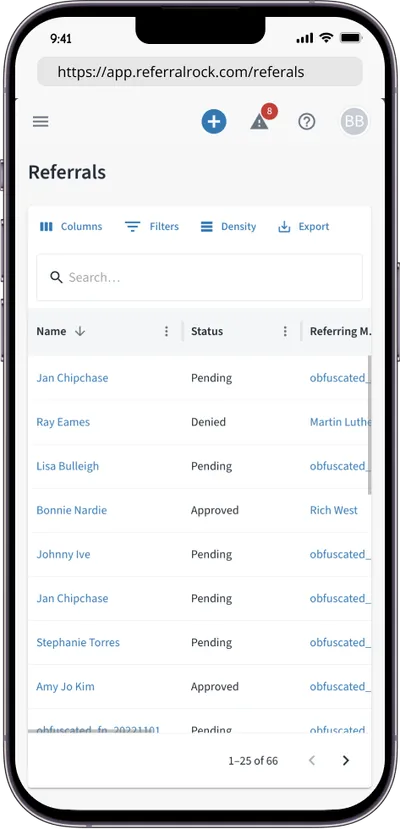
Notifications used to be one list for the whole account, so everyone got everything and most people switched them off. Now every alert has two switches of its own: who receives it, and where it lands. Finance can follow pending rewards and failed payments without hearing about every new member, and the person running the program can do the opposite.
- Settings belong to the person, not the account. A teammate turning off reward alerts leaves everyone else untouched.
- Alerts are set per program, and each person only sees the programs they have access to.
- Choose in the app, by email, or both. Similar alerts arrive grouped on a schedule rather than one email per event.
- An in-app inbox holds them until there is time: filter by program, click through to act, archive what is handled, and leave the rest unread.
Alerts cover the moments that cost something when missed: a reward pending payment, a member email bouncing so that member gets disabled, a bulk import finishing, a balance running low.
When something is wrong
Fix a mistake without opening a support ticket
A referral gets approved that should not have been. Someone is in the wrong program. A test account is sitting in the numbers. These are ordinary, and handling them is an admin job rather than a support request.
- Roll a referral status backward from the admin. A warning appears first when the change affects a reward someone has already earned, so a correction never pays twice.
- Enable, disable, or delete members in bulk from the list view, rather than one record at a time.
- Move members between programs, individually or in bulk, when a program is restructured or someone joined the wrong one.
- Every change is recorded, so there is an answer when someone asks who changed what and when. See users and access.
Getting data in and out
Upload the spreadsheet the way you already have it
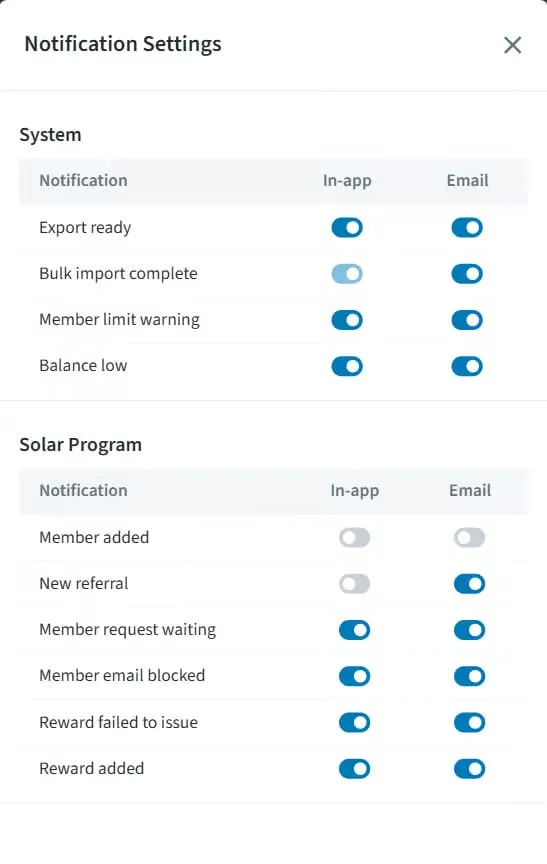
Most tools require renaming columns and reordering a file before it will import. Referral Rock reads the spreadsheet as it is, matches the columns to the right fields, and shows the result before anything is committed. Data can also be pasted straight in.
- Preview and fix errors before the import finalizes, rather than cleaning up afterwards.
- Members, referrals, customers, and coupon codes all come in the same way. See how customer import works.
- Getting data out works the same way: filter a list down to exactly what was asked for, then export that view. See analytics and reporting.
It runs where you are
Program management is rarely something anyone sits down to do. The admin is built for handling one thing between two other things.
-
A homepage built for phones
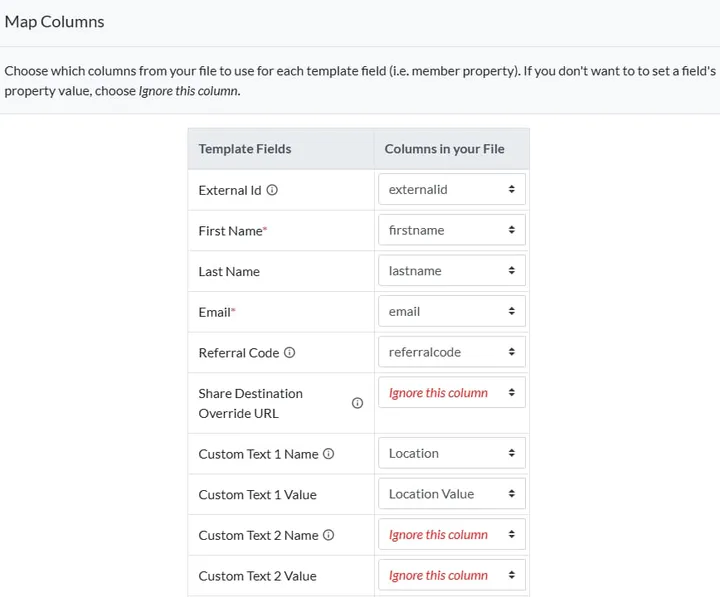
Logged in on a phone, the homepage is built for it: counts per program and one-tap actions to add a member, referral, or reward.
-
Install it to your home screen
Add the admin to a phone home screen like an app. It opens full screen and launches straight in.
-
Setup stays on desktop
Building and editing a program is deliberately desktop only. Mobile covers day-to-day management, not configuration.
-
The same search everywhere
The search that finds any member or referral works from a phone exactly as it does at a desk.
Go deeper
Three parts with a page of their own
Paying the rewards, watching the numbers, and governing who runs it are each big enough for their own page. Everything above is what surrounds them.
Reward management
Design the incentives that motivate, and pay them out automatically with no markup.
See reward managementAnalytics & reporting
See what the program returns, backed by dashboards, exports, and a weekly digest.
See analytics & reportingUsers & access
Control who runs the program across locations and brands, with roles and an admin audit trail.
See users & accessCommon questions about managing a referral program
See what running the program actually looks like
Get a guided tour of the admin, the reporting, and the controls that hold a growing program together.
Not ready to talk? See a free referral flow →